$2.99 excl. VAT

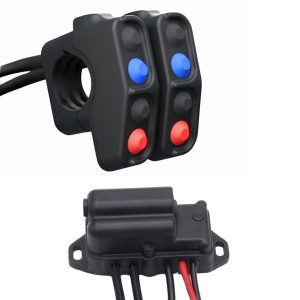
Terrain Command Button – Black – new

Factory Replacement Push-Button Switch for Terrain Command (Black – New Type)

Official replacement momentary tactile push-button switch in Black (New Type profile) engineered for post-mid-2022 Carpe Iter Terrain Command CNC button modules.

Restore full fingertip navigation without replacing your entire CNC controller pod. Engineered with a positive tactile click for use with heavy off-road riding gloves. Polarity-ignorant contacts make the 15-minute bench swap straightforward. Check before ordering: in mid-2022, the button casing shape was revised. Verify that your controller uses the post-mid-2022 “New Type” profile. For earlier models, choose the Black (Old Type) Button.

Key Highlights & Service Details:

  • Style & Era: New Type button profile (for controllers built from mid-2022 onward).
  • Color: Factory Black cap.
  • Modular Repairability: Cleanly replace a single malfunctioning switch inside the CNC housing.
  • Non-Polarized Terminals: Solder leads to either contact pin.
  • Fast Bench Service: Quick 15-minute maintenance task with common hand tools and a soldering iron.

In stock (can be backordered)

[APPLICATION_DATA // CONTROLLER SERVICE]
TCMD BUTTON BLACK (NEW)

Genuine Service Switch for Current-Generation Terrain Command Housings.

The Terrain Command Button – Black – new is the original replacement momentary switch for post-mid-2022 CNC machined button pods. It delivers positive, glove-friendly tactile feedback, ensuring map panning, zooming, and roadbook scrolling actuate reliably even in extreme vibration.
15-MINUTE STEP-BY-STEP REPLACEMENT WORKFLOW
  1. Housing Disassembly: Remove the bottom access plate on the CNC button housing using a screwdriver.
  2. Snip & Clear: Cut the wires on the faulty button and peel away the localized silicone putty.
  3. Insert Replacement: Remove the old switch and seat the new Black (New Type) switch squarely in the housing cavity.
  4. Solder Leads: Solder the wires back to the terminals. The switch is non-polarized—either wire solders to either terminal.
  5. Insulate & Seal: Apply a dab of standard silicone sealant over the solder joints to protect against moisture and vibration, then refit the cover plate.

WHY WE USE TARGETED SILICONE PUTTY
* Flooding the housing with permanent epoxy potting would make it impossible to replace individual switches, forcing riders to buy a completely new controller.
* Applying silicone putty by hand to the solder joints provides necessary vibration relief while keeping each switch independently serviceable.
ERA: POST-MID-2022 // NEW PROFILE
VALIDATION: CARPE ITER SPARE PART

[APPLICATION_DATA // CONTROLLER SERVICE]
TCMD BUTTON BLACK (NEW)

Genuine Service Switch for Current-Generation Terrain Command Housings.

The Terrain Command Button – Black – new is the original replacement momentary switch for post-mid-2022 CNC machined button pods. It delivers positive, glove-friendly tactile feedback, ensuring map panning, zooming, and roadbook scrolling actuate reliably even in extreme vibration.

15-MINUTE STEP-BY-STEP REPLACEMENT WORKFLOW
  1. Housing Disassembly: Remove the bottom access plate on the CNC button housing using a screwdriver.
  2. Snip & Clear: Cut the wires on the faulty button and peel away the localized silicone putty.
  3. Insert Replacement: Remove the old switch and seat the new Black (New Type) switch squarely in the housing cavity.
  4. Solder Leads: Solder the wires back to the terminals. The switch is non-polarized—either wire solders to either terminal.
  5. Insulate & Seal: Apply a dab of standard silicone sealant over the solder joints to protect against moisture and vibration, then refit the cover plate.

WHY WE USE TARGETED SILICONE PUTTY
* Flooding the housing with permanent epoxy potting would make it impossible to replace individual switches, forcing riders to buy a completely new controller.
* Applying silicone putty by hand to the solder joints provides necessary vibration relief while keeping each switch independently serviceable.
ERA: POST-MID-2022 // NEW PROFILE
VALIDATION: CARPE ITER SPARE PART
Terrain Command Button - Black - new
[ PRODUCT_MEDIA_STAGE ]
Terrain Command Button - Black - new
Discover more on our Official channel @carpeiterNavigation
Explore the product manuals, wiring guides, and setup documentation below to get the most out of your gear.
Need extra help or looking for deeper technical guides?
Visit our CarpeIter Knowledge Base
Ridden with this gear on the trail?
Share your real-world setup photos and field reports on the Tribe forum.

[RELATED HARDWARE]