$2.99 excl. VAT

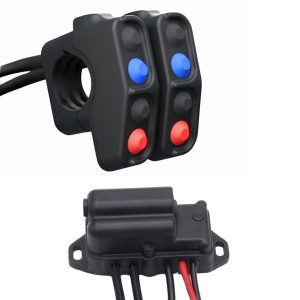
Terrain Command Button – Blue (new)

Factory Replacement Push-Button Switch for Terrain Command (Blue – New Type)

Official replacement momentary tactile push-button switch in Blue (New Type profile) engineered for post-mid-2022 Carpe Iter Terrain Command CNC button modules.

Restore full fingertip navigation without replacing your entire CNC controller pod. Engineered with a positive tactile click for use with heavy off-road riding gloves. Polarity-ignorant contacts make the 15-minute bench swap straightforward. Check before ordering: in mid-2022, the button casing shape was revised. Verify that your controller uses the post-mid-2022 “New Type” profile. For earlier models, choose the Blue (Old Type) Button.

Key Highlights & Service Details:

  • Style & Era: New Type button profile (for controllers built from mid-2022 onward).
  • Color: High-visibility Blue cap.
  • Modular Repairability: Cleanly replace a single malfunctioning switch inside the CNC housing.
  • Non-Polarized Terminals: Solder leads to either contact pin.
  • Fast Bench Service: Quick 15-minute maintenance task with common hand tools and a soldering iron.

In stock (can be backordered)

[APPLICATION_DATA // CONTROLLER SERVICE]
TCMD BUTTON BLUE (NEW)

Factory Tactile Push-Button for Post-Mid-2022 Terrain Command Housings.

The Terrain Command Button – Blue – new is the original replacement switch for modern CNC Terrain Command handlebar pods. It matches factory travel, spring resistance, and tactile engagement so your navigation controls feel consistent under all conditions.

15-MINUTE STEP-BY-STEP REPLACEMENT WORKFLOW
  1. Open Housing: Remove the bottom plate of the CNC aluminum housing with a precision screwdriver.
  2. Snip Wires & Remove Putty: Cut the wiring on the damaged switch and peel away the silicone putty surrounding it.
  3. Swap Switch: Remove the old button and seat the new Blue (New Type) switch squarely into the CNC cavity.
  4. Solder Leads: Solder the wires back onto the contact pins. The switch is non-polarized—either wire can connect to either pin.
  5. Insulate & Close: Apply a small bead of silicone sealant over the solder joints to isolate from water and vibration, then reinstall the back plate.

SERVICE-FRIENDLY SILICONE SEALING
* Targeted silicone application allows individual buttons to be cleanly extracted and serviced on your bench without damaging surrounding circuitry or the aluminum housing.
* Provides essential strain relief for the solder joint against extreme single-cylinder vibration.
ERA: POST-MID-2022 // NEW PROFILE
VALIDATION: CARPE ITER SPARE PART

[PHYSICAL_PARAMETERS // SPECS]
SWITCH SPECIFICATION
Product ClassificationTactile Momentary Push-Button Spare Part
Profile RevisionNew Type (installed from mid-2022 onward)
Cap ColorBlue
Switch ActuationNormally-Open (NO) Momentary Contact
Polarity RequirementPolarity Ignorant (leads solder to either terminal)
Controller CompatibilityTerrain Command CNC Aluminum Button Modules (post-mid-2022)
TERMINATION: SOLDER PINS // NON-POLARIZED
VALIDATION: CARPE ITER CERTIFIED
Terrain Command Button - Blue (new)
[ PRODUCT_MEDIA_STAGE ]
Terrain Command Button - Blue (new)
Discover more on our Official channel @carpeiterNavigation
Explore the product manuals, wiring guides, and setup documentation below to get the most out of your gear.
Need extra help or looking for deeper technical guides?
Visit our CarpeIter Knowledge Base
Ridden with this gear on the trail?
Share your real-world setup photos and field reports on the Tribe forum.

[RELATED HARDWARE]