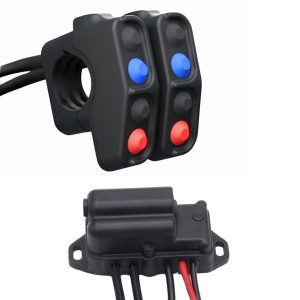
$2.99 excl. VAT

Terrain Command Button – Red (old)

Factory Replacement Push-Button Switch for Terrain Command (Red – Old Type)

Official replacement momentary tactile push-button switch in Red (Old Type profile) engineered for pre-mid-2022 Carpe Iter Terrain Command CNC button modules.

Revive your trusted early-generation Terrain Command without buying an entire replacement button block. Designed to fit the specific body dimensions of CNC housings manufactured prior to mid-2022. Easy solder-in installation with polarity-ignorant wiring takes just 15 minutes. Verify your button profile before purchasing—the early “Old Type” profile differs distinctly from post-mid-2022 units. If your controller is newer, order the Red (New Type) Button.

Key Highlights & Service Details:

  • Style & Era: Old Type button profile (fitted to controllers produced up to mid-2022).
  • Color: High-visibility Red cap.
  • Individual Field Service: Replace a single damaged switch rather than replacing the complete aluminum housing.
  • Polarity-Ignorant Wiring: Terminal leads solder in either orientation.
  • Quick Maintenance: Simple 15-minute bench procedure using a screwdriver and standard soldering iron.

In stock (can be backordered)

[APPLICATION_DATA // CONTROLLER SERVICE]
TCMD BUTTON RED (OLD)

Service Component for Early-Generation Terrain Command Controllers.

The Terrain Command Button – Red (old) provides long-term service support for riders using early-generation Terrain Command controllers manufactured prior to mid-2022. It features the exact mounting barrel profile required to seat properly inside earlier CNC machined aluminum pods.

15-MINUTE STEP-BY-STEP REPLACEMENT WORKFLOW
  1. Open Housing: Remove the bottom retention plate from the CNC button housing using a screwdriver.
  2. Snip & Clear Putty: Cut the wiring leads connected to the faulty switch and peel out the surrounding targeted silicone sealant.
  3. Insert Replacement: Extract the old switch body and seat the new Red (Old Type) button into the CNC pocket.
  4. Solder Leads: Solder the wires back to the terminals. Polarity does not matter—connect either wire to either pin.
  5. Re-Seal: Dab fresh silicone sealant over the solder connections to protect against water ingress and vibration fatigue, then reattach the cover plate.

SERVICEABLE ENGINEERING PHILOSOPHY
* We intentionally apply silicone putty only directly around the switch solder contacts rather than potting the entire pod solid.
* This ensures riders can independently replace single switches in the field without rendering the precision CNC aluminum housing useless.
ERA: PRE-MID-2022 // OLD PROFILE
VALIDATION: CARPE ITER SPARE PART

[PHYSICAL_PARAMETERS // SPECS]
SWITCH SPECIFICATION
Product ClassificationTactile Momentary Push-Button Spare Part
Profile RevisionOld Type (controllers manufactured up to mid-2022)
Cap ColorRed
Switch ActuationNormally-Open (NO) Momentary Contact
Polarity RequirementPolarity Ignorant (leads solder to either terminal)
Controller CompatibilityEarly-generation Terrain Command CNC Aluminum Button Modules
TERMINATION: SOLDER PINS // NON-POLARIZED
VALIDATION: CARPE ITER CERTIFIED
Terrain Command Button - Red (old)
[ PRODUCT_MEDIA_STAGE ]
Terrain Command Button - Red (old)
Discover more on our Official channel @carpeiterNavigation
Explore the product manuals, wiring guides, and setup documentation below to get the most out of your gear.
Need extra help or looking for deeper technical guides?
Visit our CarpeIter Knowledge Base
Ridden with this gear on the trail?
Share your real-world setup photos and field reports on the Tribe forum.

[RELATED HARDWARE]